Tanıdık Bul: a free LinkedIn extension for job seekers
Who does your contact know at the company in the job post?
While you look at a job post on LinkedIn, open in one click the search for the connections that a contact you trust has at that company. The search opens in a new tab, on LinkedIn's own search page. Then ask your contact for an introduction, and track your applications in one place.
Early access version 0.4.0. Free. No account or sign-up needed. The extension's interface is in Turkish only for now. How to update ↓
It installs on a computer; if you are on your phone, open this page on your computer.
Why?
When you are job hunting, the strongest door is someone inside the company introducing you. But on LinkedIn, answering "who does my contact Ayşe know at this company?" takes the same steps for every job post: go to Ayşe's profile, open her connections, filter by the company, go back to the job. Tanıdık Bul prepares that search for you and opens it in one click.
How does it work?
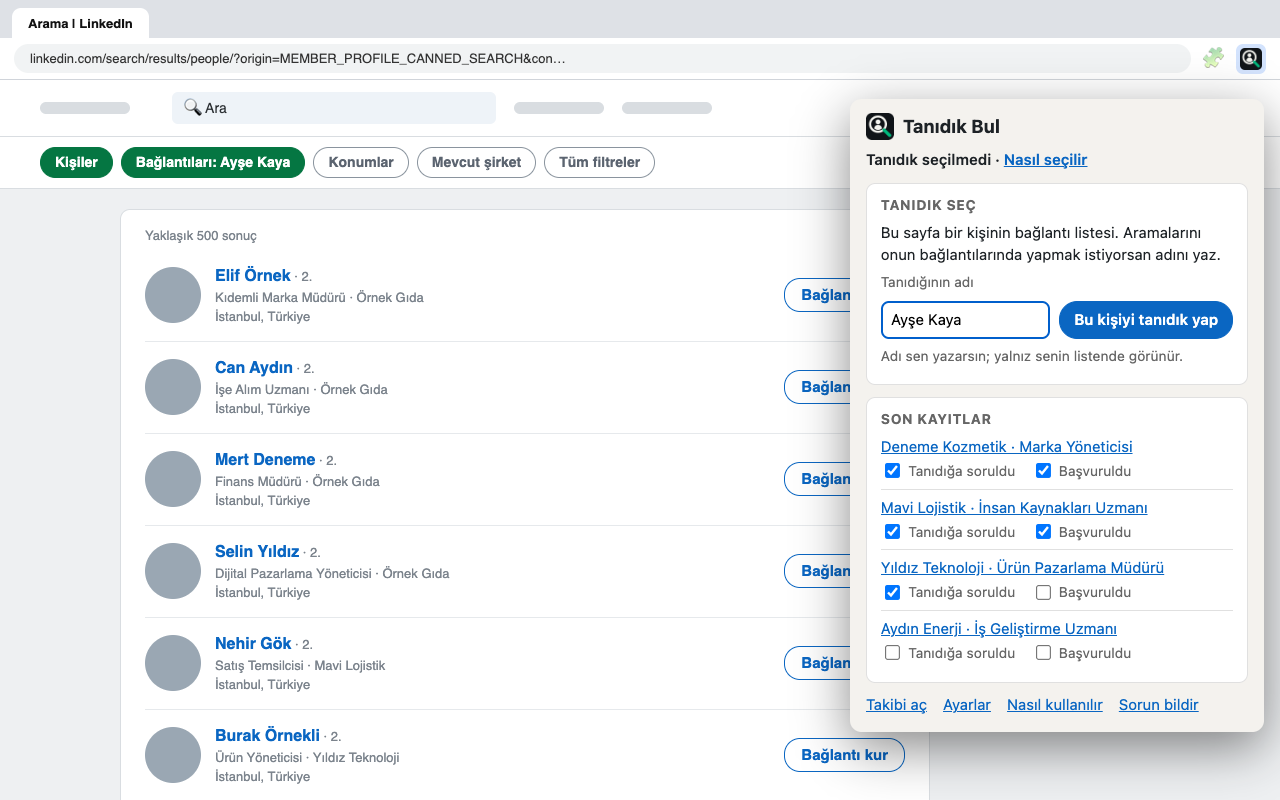
Pick your contact. On the profile of a 1st-degree connection you trust, click their connection count ("500+ connections"). On the page that opens, press the Tanıdık Bul icon in the toolbar, type their name and press Bu kişiyi tanıdık yap (make this person my contact). Once is enough.
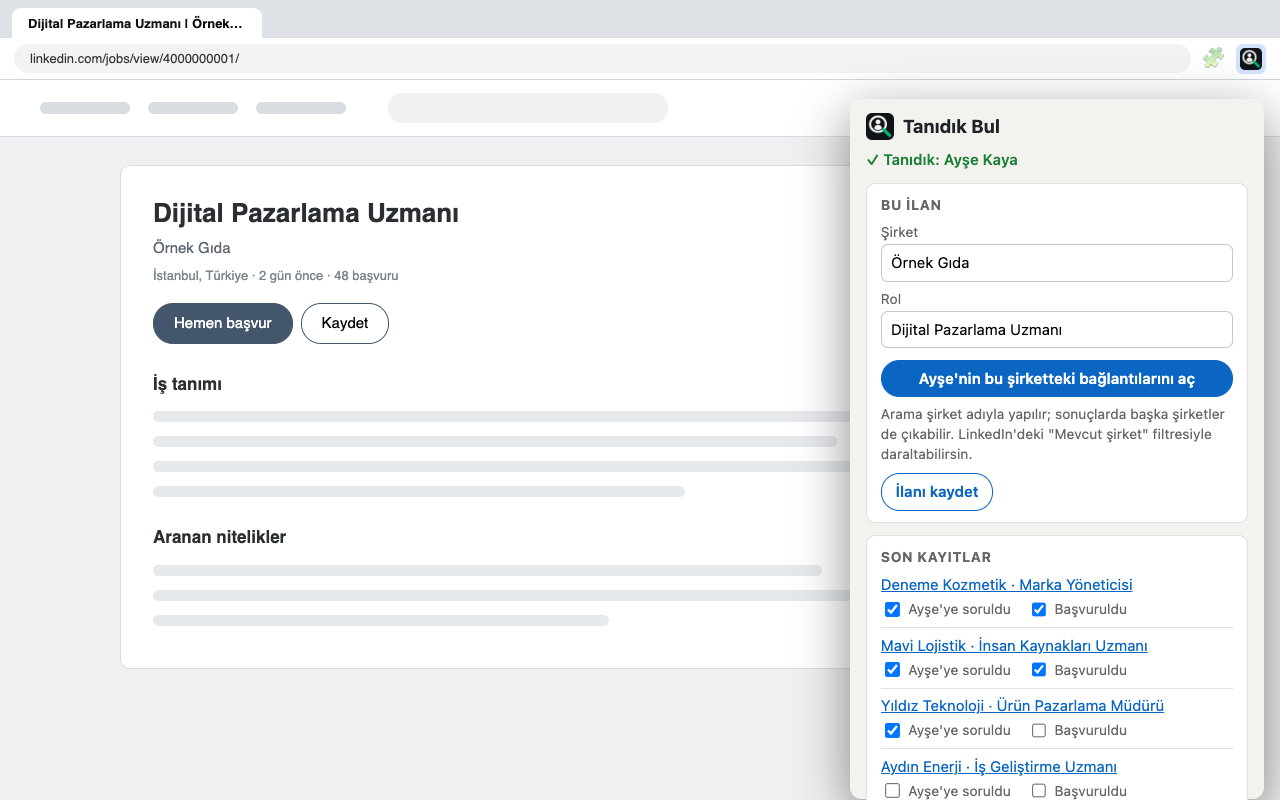
Press the icon on a job post. When you open a job post and press the icon, the company and role are already filled in the popup.
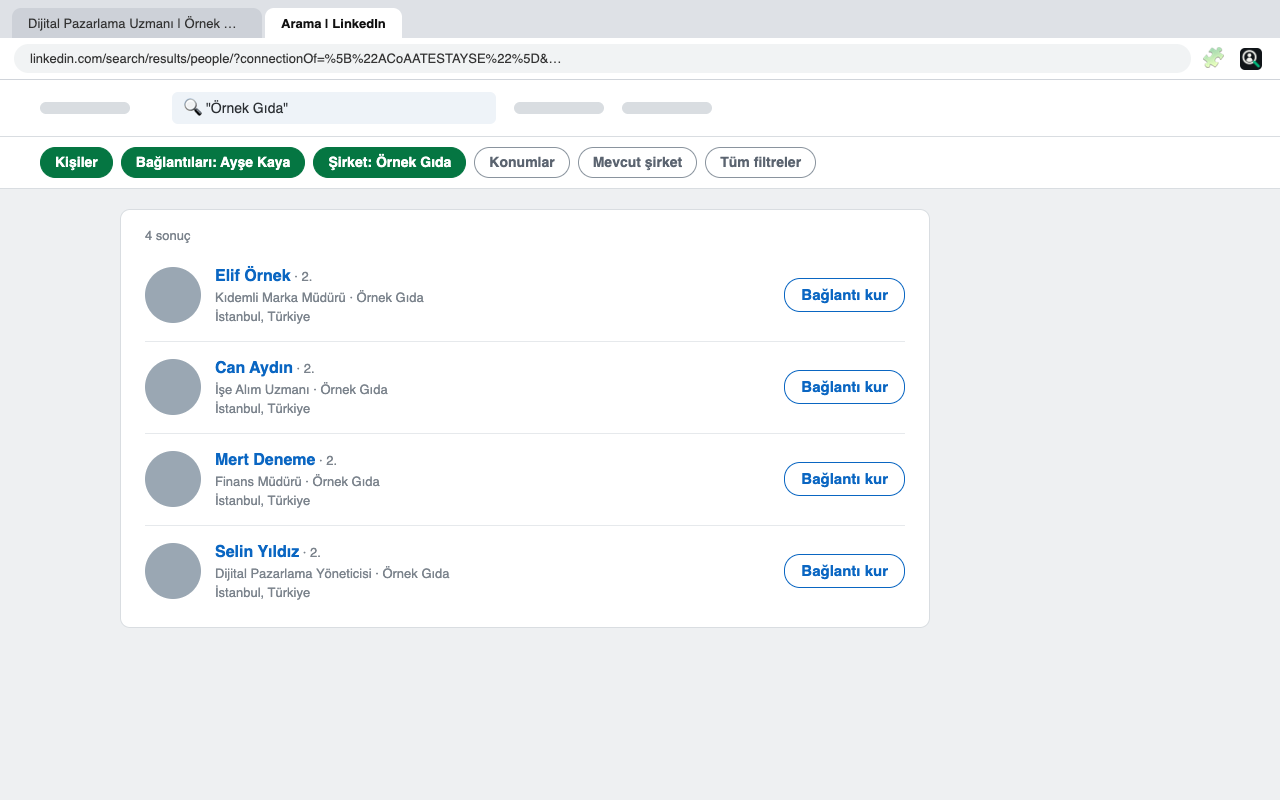
Open the search. The Bağlantılarını aç (open their connections) button opens your contact's connections at that company on LinkedIn's own search page, in a new tab. You see the results there and can narrow them with LinkedIn's filters if you like.
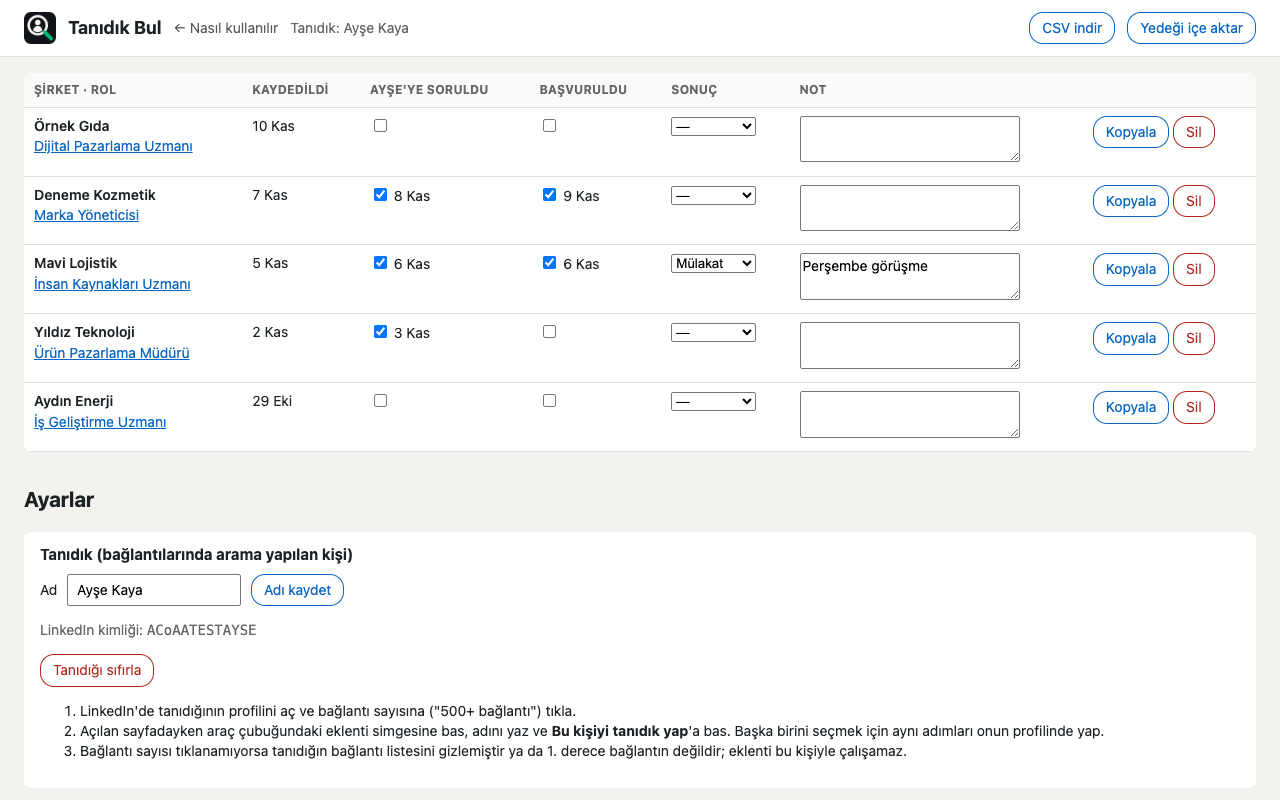
Save and track. Save the job in the same popup; keep track of asking your contact, applying, the result and your notes in one table. Download it as CSV if you like.
Protecting your account
- The extension does not read LinkedIn pages and does not add anything to them. You will not see a box, button or panel on the job page.
- Only when you press the icon does it look at the address and title of the open tab. It does not look at the page content.
- The only thing it does is prepare the search you would run by hand and open it in a new tab. You see the search on LinkedIn's own page.
- It does nothing on its own: it does not search in the background, send messages, send connection requests or browse profiles.
Where is your data?
Only in your browser. We have no server and no analytics, and nothing is shared with anyone. What is stored: the name you type for your contact, the jobs you save, your marks and your notes. Removing the extension deletes all of it. Details: Privacy policy.
The risk you should know
Tanıdık Bul is not an official LinkedIn tool and is not endorsed by LinkedIn. LinkedIn's rules do not allow extensions that read pages or change how they look; Tanıdık Bul does neither. Even so, we cannot guarantee how LinkedIn will respond to anything. The extension shows you this during setup and does not work without your consent. The decision is yours.
Installation (2-3 minutes)
The extension is not in the Chrome Web Store yet; you download it here and install it with Chrome's Developer mode. It works the same in Chrome, Brave and Edge.
Download: get
tanidik-bul-0.4.0.zipwith the button above; it lands in your Downloads folder.Unzip: double-click the zip (on Windows, right-click → Extract All). A
tanidik-bulfolder comes out.Move it somewhere permanent: move the folder to Documents. After that, do not move or delete it; the extension runs from this folder.
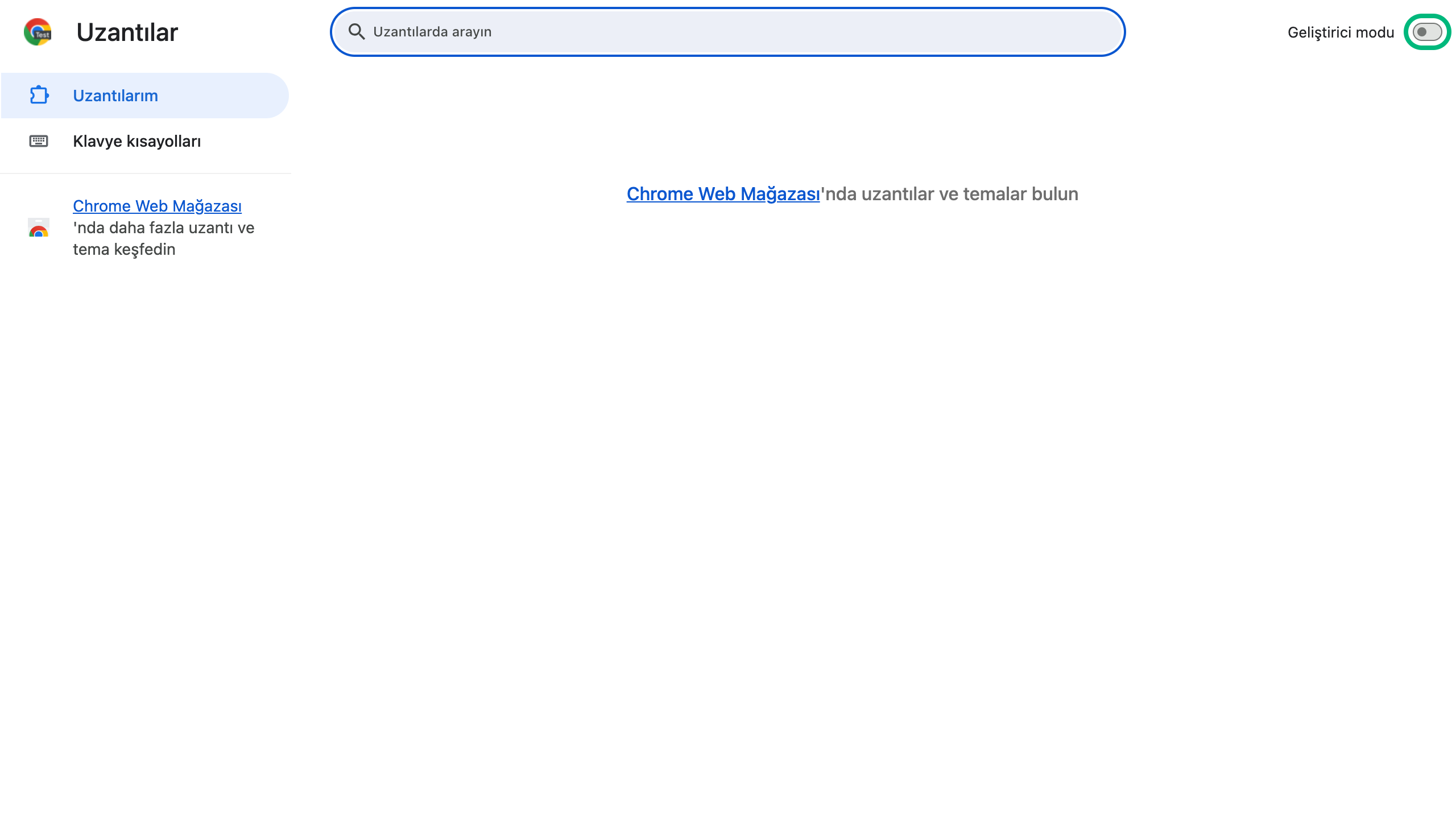
Extensions page: type
chrome://extensionsin the address bar (Brave:brave://extensions, Edge:edge://extensions).Developer mode: turn on the switch at the top right (in Edge, at the bottom left).
Load: press Load unpacked and select the
tanidik-bulfolder (do not open it, select the folder itself; it should contain amanifest.jsonfile).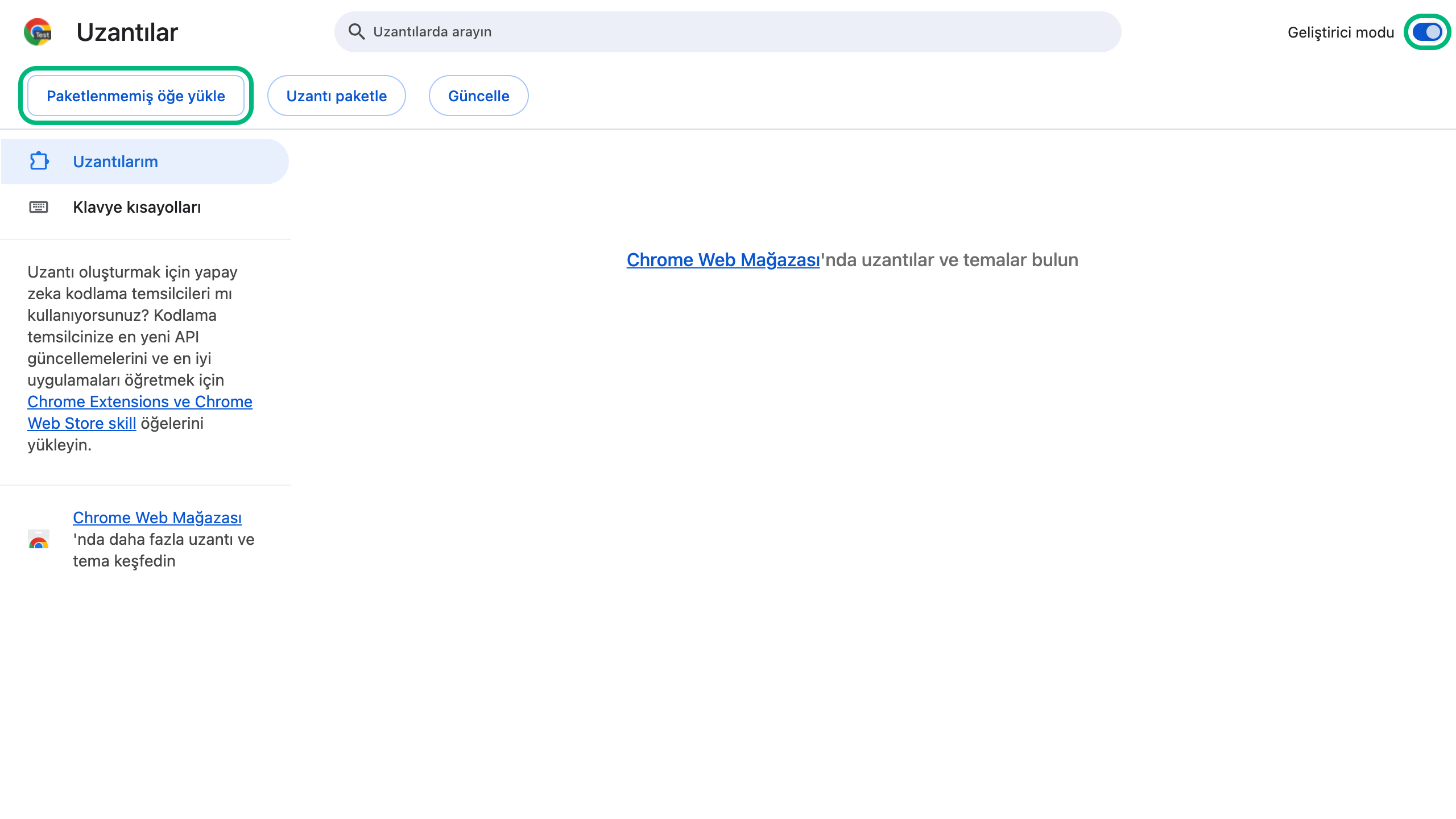
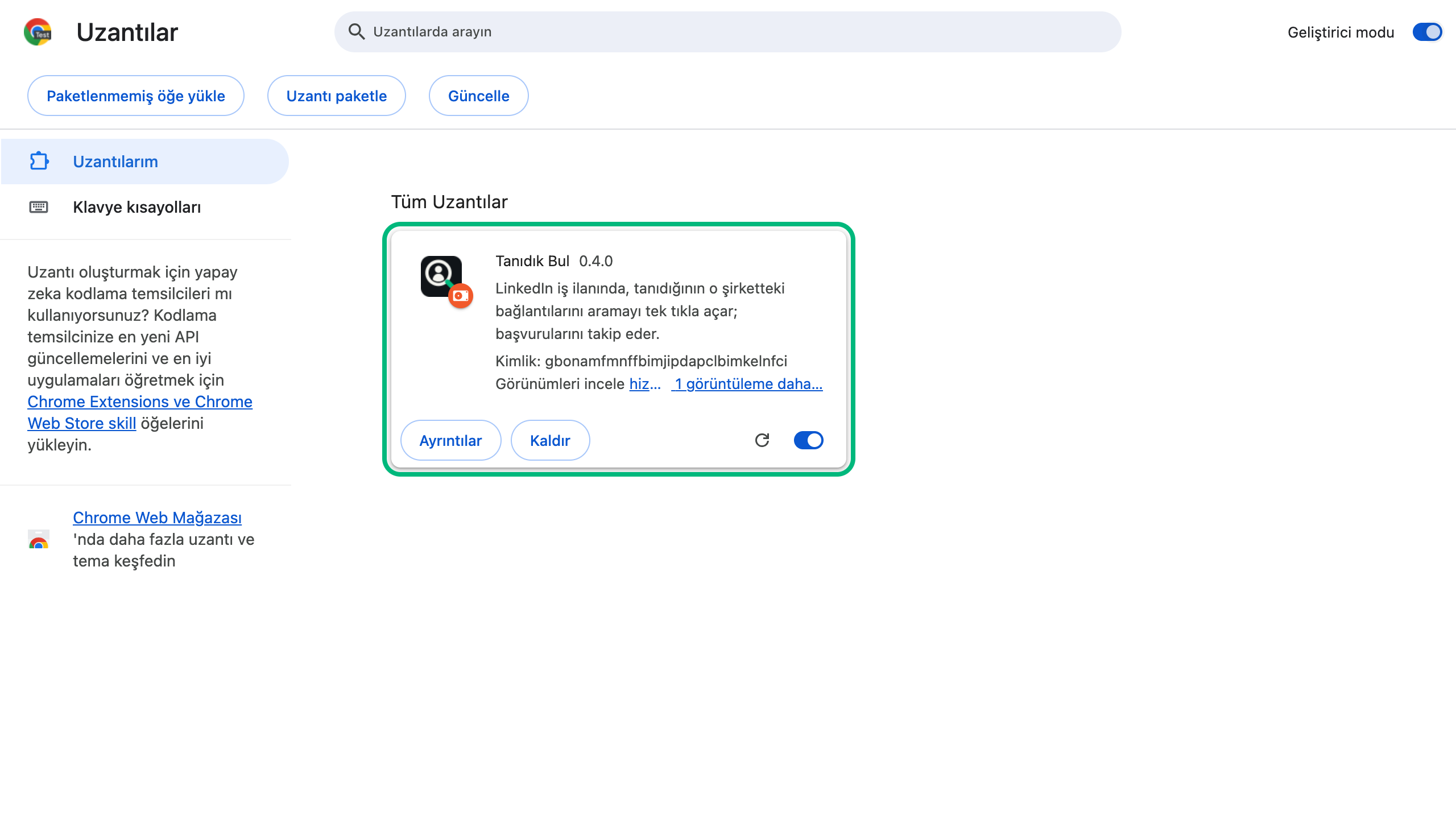
Ready: the Tanıdık Bul card appears and the welcome page opens. Give your consent there.
Pin the icon: press the puzzle icon in the toolbar, then the pin next to Tanıdık Bul. Everything is done from this icon. If the browser shows a developer mode warning at startup, do not press Disable; just close the warning.
Updating and removing
We announce new versions on this page. An extension installed with Developer mode does not update itself:
Download and unzip the new zip.
Copy the files inside it over the same
tanidik-bulfolder in Documents and confirm "Replace".On the
chrome://extensionspage, press the ↻ icon on the Tanıdık Bul card.
As long as the folder stays in the same place, your records are kept.
If you use 0.3.0: you move to 0.4.0 the same way. Your chosen contact, saved jobs, marks and notes are kept. The lists of people next to your jobs are deleted, because the extension no longer reads LinkedIn pages; to keep them, press CSV indir (download CSV) on the tracking page before updating. After updating, reload any open LinkedIn tabs once.
To remove it, press Remove on the Tanıdık Bul card at chrome://extensions, then delete the tanidik-bul folder in Documents. Your records are deleted too; to keep them, first press CSV indir (download CSV) on the tracking page.
Frequently asked questions
- Does it cost anything?
- No.
- Why is there no box on the job page?
- To protect your account. The previous version added a box to the job page and read the search results; LinkedIn's rules do not allow that. Since 0.4.0 the extension does not touch LinkedIn pages at all; everything is done from the toolbar icon.
- The results include people from other companies. Why?
- The search is usually run with the company name. You can narrow it by picking the company in the "Current company" filter on LinkedIn's search page.
- Why isn't it in the store?
- We will apply to the store soon; once it is approved, an "Add to Chrome" button will appear here and updates will arrive automatically.
- Is Developer mode safe?
- Developer mode is a standard Chrome setting that lets you install extensions from outside the store. You can open and read the code in the folder you load; it downloads no code from outside and sends no data to any server.
- Who should I pick as my contact?
- A 1st-degree connection who knows you well and whose connection list is visible. If the list is hidden, the connection count on their profile cannot be clicked and the extension cannot work with that person.
- Does it work on mobile?
- No, only on a computer, in Chrome, Brave and Edge.
- Something went wrong.
- Write to us from the Contact page with a screenshot.
Our other free tool for job seekers
A free AI career assistant for people thinking about changing jobs.
Tanıdık Bul was built by Rapture Consultancy for our own needs. LinkedIn is a trademark of LinkedIn Corporation and has no connection to Tanıdık Bul.
Last updated: